











Summary

Key Takeaway
|
The “Virtual Assistant” (VA) boom is real, but the general market for administrative or creative tasks is crowded, and the skills can feel replaceable.
The biggest, most stable opportunity isn’t in social media. It’s in the essential, technical work that every single modern business needs to survive.
The answer is to stop just using a company’s software and become the expert who manages it.
This guide is about that hidden, in-demand career: The IT Virtual Assistant.
And in this, you’ll learn:
- What the job actually is (from helpdesk to system maintenance).
- Why small businesses desperately need this role.
- The two clear paths to get started, including the exact certifications that prove your skills.
What “IT Virtual Assistant” Actually Means
First, let’s clarify the terminology. The “VA” part of the title can be confusing.
First, What is a General Virtual Assistant?
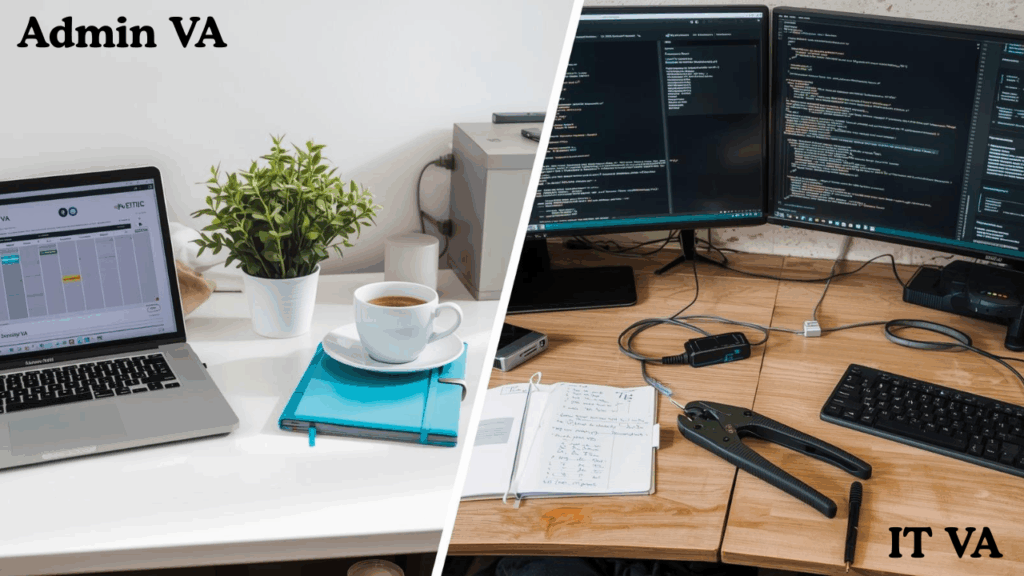
A General Virtual Assistant (VA) is a remote contractor who helps businesses with non-technical tasks. Their work usually includes:
- Administrative Tasks: Managing email inboxes, scheduling appointments, and booking travel.
- Creative Tasks: Managing social media accounts, writing blog posts, or doing basic graphic design.
- Operational Tasks: Customer service emails, data entry, or managing an e-commerce store’s orders.
A General VA uses a company’s software to get work done. Their work is often a mix of the above tasks, which you can see in a typical day in the life of a VA.
Because the role is so flexible, many specialize in top career fields like real estate, marketing, or e-commerce.
So, What Makes an IT Virtual Assistant Different?
The difference is simple: Technical Skill.
- A General VA uses software (like Microsoft 365 or Google Calendar).
- An IT VA manages, fixes, and secures the software for the entire company.
In practice, “IT VA” is a modern term for a Freelance IT Consultant or Remote IT Support Specialist. The “VA” part describes the business model (remote, contract-based), while the “IT” part describes the technical skill set.
The Role: What the Job Actually Entails
As an IT VA, you are your client’s remote, on-demand tech department. Your job is to prevent technical problems and fix them fast when they happen.
Your job has two parts: the services you offer (which fall into three areas) and the remote method you use to perform them.
1. The Frontline: Helpdesk and User Support
This is the most common and immediate task. You are the first point of contact for an employee’s tech problems.
- Troubleshooting: Fixing daily problems like “My email is frozen,” “I can’t connect to the Wi-Fi,” or “This app is running slow.”
- Ticket Management: Using a simple system (even a Trello board) to log and track all user requests so nothing gets missed.
- Onboarding: When the client hires someone, you set up their company accounts, email, and software access.
- Offboarding: When an employee leaves, you secure the data, deactivate their accounts, and revoke their access.
2. The Foundation: System and Maintenance
This is the proactive, “behind-the-scenes” work. This is how you prevent problems and justify a stable, monthly retainer fee from your clients.
- Software Updates: You will ensure all operating systems (Windows, macOS) and applications are fully patched and updated. This is a critical security task.
- Data Backups: You will manage and—most importantly—test the client’s data backups. You are the one who makes sure that if a disaster happens (like a fire or a hack), the business’s data is safe and can be restored.
- Cloud Management: You will manage their core cloud services, like Microsoft 365 or Google Workspace, including setting up user permissions, managing shared files, and monitoring storage.
- Website Maintenance: You may also perform basic website updates, monitor for downtime, and ensure plugins (e.g., on WordPress) are current and secure.
3. The Specialist: Advanced Support
This is not an entry-level role but a career progression. After gaining experience, you can specialize in high-value areas.
- Network & Security: You will configure firewalls, manage antivirus and anti-malware software, and set up and manage secure VPN access for remote employees.
- Cloud Infrastructure: Beyond basic email, you might assist with managing advanced cloud platforms like Amazon Web Services (AWS) or Microsoft Azure, such as monitoring costs or user access.
- Disaster Recovery: You will help your client design and document a step-by-step plan for “what to do if we get hit with ransomware.”
The “How” (The Reality of Remote Support)

A common question many people have is: “How can I fix a printer I can’t touch?”
The answer is that your job is remote diagnosis, not a physical fix. You are paid to be the technical expert, not to be physically present.
Example: A client says, “The printer is offline.”
- Your Process: You don’t try to fix the printer. You remotely access the client’s network. You check the printer’s network status and see it’s unreachable. You then check the Wi-Fi access point it’s connected to and find that the device is frozen.
- Your Action: You call the office manager (your “remote hands”) and give them a simple instruction: “Please unplug the white box on the filing cabinet, wait 10 seconds, and plug it back in.”
- The Result: The access point reboots, the printer reconnects, and the problem is solved. You fixed the problem with 90% diagnosis and 10% guided action. This is the core of remote IT support.
The Opportunity: Why This Career is In-Demand
The demand for this skill set is high because it solves a critical, expensive problem for small and medium businesses (SMBs).
Why Businesses Need This Role
Your ideal client is a 15-person law firm or a 20-person dental practice. They have complex tech needs (security, servers, cloud data) but cannot afford a $70,000/year, full-time, in-house IT employee.
They bridge this gap in one of two ways:
- Hiring a freelance IT specialist (an “IT VA”).
- Outsourcing their tech needs to a Managed Service Provider (an “MSP”).
This gives them access to expertise without the massive overhead of a salary, benefits, payroll taxes, and retirement.
This creates a high demand for technicians in both paths. Here is why the market is so strong:
Access to Specialized Skills
That 15-person law firm doesn’t need a full-time cybersecurity expert, but they do need someone to manage their firewall for a few hours a week. External IT support allows them to pay for a small slice of a specialist’s time.
Scalable Support
A business’s needs change. External IT support (both freelance and MSP) allows them to scale up for a big project (like an email migration) and then scale back down for routine maintenance.
Frees Up the Core Team
Without professional tech support, the unofficial “IT guy” is the office manager or the top salesperson. Every minute they spend fixing a printer is a minute they aren’t managing or selling. This “shadow work” is a major productivity drain that a dedicated technician solves.
Flexible Support (Beyond 9-to-5)
External IT providers are often equipped to handle after-hours or emergency support, giving clients a level of service and peace of mind that a single employee can’t provide.
Why It’s a Great Career Path for You
Beyond the high demand, this field offers a clear and rewarding ladder for professional growth.
A Clear Path for Advancement
You can start at the helpdesk, gain experience, get certifications (like Network+, Security+), and move into high-value specializations like cybersecurity, cloud infrastructure, or network engineering. Each step brings more responsibility and higher pay.
Rapid, Real-World Learning
This is a major benefit, especially if you start at an MSP (Path B). You won’t be stuck on one company’s single network. You will be exposed to dozens of different systems, problems, and industries in a short time. Your real-world skills will grow exponentially faster than in a traditional corporate job.
Durable, Essential Skills
These technical skills are not a “nice to have”; they are a core, essential need for every modern business. This creates a high level of long-term career stability for qualified technicians.
Long-Term Flexibility
Once you have significant experience (5+ years), you have options. You can choose to become a high-level specialist within a company, or you can leverage that deep expertise to start your own successful freelance business. You’ll have a strong reputation, be able to command high rates, and build the flexible schedule you want.
A Practical Guide to Getting Started
This is a technical career. The gap between “using a calendar” and “managing an email server” is real, and it is bridged with experience and certifications.
Get Certified (The Foundation)
The path starts with being able to prove you are “good with computers.”
A CompTIA A+ Certification is the global standard that proves you know hardware, software, and troubleshooting. A Network+ proves you understand how networks (like Wi-Fi) actually work. This is your starting line.
Note: A structured program is the most effective way to gain these foundational skills. The Computer Support Technician Training at CCI Training Center, for example, is designed to give you practical experience for this role, often including simulation labs and preparation for your A+ exam.
Choose Your Path: Freelance vs. Employee

Below are the two main paths you can take.
Path A: The Freelance (“IT VA”) Model
This is the “be your own boss” path, where you start your own business.
- Pros: Total flexibility, you set your rates, and your earning potential is high.
- Cons: You are responsible for everything: marketing, sales, billing, and taxes. You have a “feast or famine” income cycle.
- The Risk: You are personally liable if you make a mistake. If you accidentally delete a client’s data, you can be sued. This requires you to purchase Professional Indemnity (Liability) Insurance, which is a significant business cost.
- The “Experience Paradox”: It can be difficult to get your first client when you have zero experience, as no one wants a beginner managing their secure data.
Path B: The Employee Model
This is the “get a job” path, where the goal is to get paid to learn and build a foundation.
- The Ideal First Job: An “Entry-Level Helpdesk Technician” at a Managed Service Provider (MSP). An MSP is a company that acts as the outsourced IT department for many small businesses (your ideal future clients).
- Pros: You get a steady paycheck. You have mentors (Tier 2 and Tier 3 techs) to learn from. You will see dozens of different networks and problems, accelerating your learning. You are covered by the company’s liability insurance.
- Cons: Less flexibility and a fixed salary.
A Career Ladder (How to Cross the Gap)
This is a common progression that takes you from beginner to specialist.
- Level 1: Helpdesk (0-2 years): You master the “Frontline” role. You learn by solving hundreds of small problems.
- Level 2: Sysadmin (2-5 years): You move from reacting to preventing. You manage the “Foundation” (servers, networks, backups).
To make this leap, you’ll need deeper skills. This is where a comprehensive Computer and Network Technician Program can be valuable, as it bundles the A+, Network+, and other advanced skills. - Level 3: Specialist (5+ years): You now have the deep experience to specialize in Security, Cloud (AWS/Azure), or Network Architecture.
At this point (Level 3), you have the skills, experience, and confidence to leave your job and start a successful, high-value freelance (“IT VA”) business. You’ve used the employee path to safely and effectively become the expert that Path A requires.
The Blunt Truth
This is a rewarding career, but it’s important to be realistic about the challenges of both the job and the different paths you can take.
The Challenge of the Job Itself
This can be a high-stress, high-stakes role. When a client’s server is down, they are losing money every minute. You are the one on the clock to fix it. Technology also changes constantly. You must be a continuous student just to keep your skills sharp.
The Specific Challenges of Path A (Freelancing)
If you choose the freelance path, you are not just a technician; you are a full-time business owner. You are responsible for:
- Marketing and Sales: Finding your own clients, which is a completely separate skill.
- Admin and Billing: Sending invoices and, at times, “chasing payments.”
- Income Instability: The “feast or famine” cycle is real. You will have busy months and months with little to no work, especially at the start.
- Total Liability: As mentioned, you are 100% liable for your mistakes and must pay for your own professional insurance.
The Specific Challenges of Path B (The Employee)
This path is safer, but it’s not easy.
- An entry-level MSP job is often high-paced and demanding. You will be on the front lines, dealing with many clients who are often stressed or upset.
- The pay for an entry-level helpdesk role is modest. It is a “pay your dues” environment. This is the trade-off you make for the invaluable experience, mentorship, and safety net (like a steady paycheck and company insurance) that it provides.
Your Next Step
Don’t try to be a “specialist” on day one. Start at the beginning.
Your first, most practical step is to go to the CompTIA website and look at the objectives for the A+ certification. That is the foundation of this career. That is your starting line.
 Martin Zandi
 Carey Maceira
 Carey Maceira
 Carey Maceira
 Carey Maceira
 Joseph Weber